There’s a particular kind of friction every developer knows: you sit down at a different machine, your laptop instead of your desktop, or your phone while waiting for a train. Then suddenly your project feels far away. The repo isn’t cloned. The Node version is wrong. The database is empty. The ten minutes you had to jot down an idea evaporate into setup.
I wanted to get rid of that friction entirely. The result is a small, always-on development server running on a Raspberry Pi 5 in the corner of my room, and a setup where every device I own: desktop, laptop, Android phone. They’re just a different window into the same live project.
This article is the story of how that environment is built, why it’s shaped the way it is, and where its limits are.
The Problem: Your Dev Environment Shouldn’t Live on One Machine
Most of us treat our main computer as the place where code happens. The editor, the runtimes, the databases, the half-finished branches — all of it lives on one hard drive. It works, until it doesn’t:
- You switch machines and lose your open tabs, your terminal history, your running dev server.
- You install five versions of Node for five projects and your OS starts feeling like a junk drawer.
- You want to code for twenty minutes on your phone during a commute and the answer is… basically no.
What I wanted was something closer to how we already think about production: a server that’s just there, running the stack, that any client can connect to. Except this server lives on my desk, costs the price of a nice dinner, and belongs only to me.
The Shape of the Setup
The environment has three layers, and it helps to picture them before diving into any config:
- The host — a Raspberry Pi 5 running Raspberry Pi OS, with
code-serverexposed as a browser-accessible VS Code instance. - The stack — a Docker Compose bundle holding the PHP/Apache backend, a MySQL database, and a Vite/React frontend. Everything the project actually runs on.
- The clients — whatever device I happen to be on: a browser tab, native VS Code over Remote-SSH, or Termius on Android.
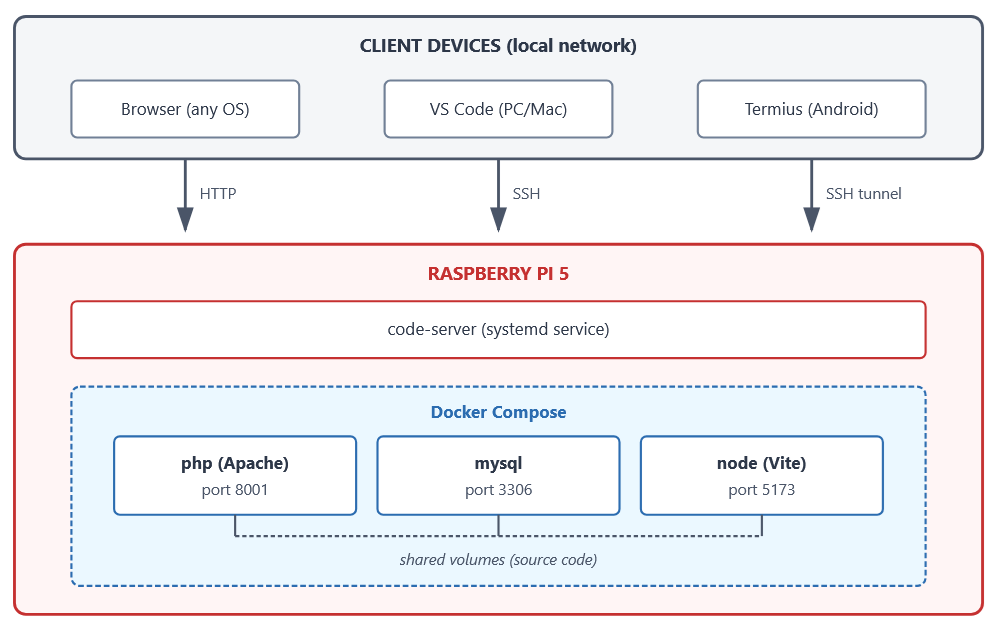
The important thing to notice: nothing project-specific is installed on the Pi itself. No PHP, no Node, no MySQL. The only things the host needs are Git, Docker, OpenSSH, and code-server. Everything else lives inside containers. The Pi stays clean; the stack is disposable.
Why a Raspberry Pi at All?
You could do all this on a cloud VM. You could do it on an old laptop in a closet. Why a Pi 5?
Because it hits a sweet spot. It sips power, so leaving it on 24/7 doesn’t feel wasteful. It’s quiet enough to sit on a desk. It’s fast enough, genuinely so, the 5 is a real jump to run a three-container web stack without complaining. And it’s mine: no monthly bill, no provider I have to trust, no egress charges when I pull a Docker image.
And because it’s a real computer, not a toy, everything you’d do on a “normal” server works: systemd services, SSH keys, apt packages, Docker. Nothing is special. Nothing is Pi-flavoured.
Layer 1: Making the Pi a Real IDE Host with code-server
The first piece is code-server, which is VS Code compiled to run as a web server. You open a browser, you log in, and you get the real VS Code UI, extensions, terminal, git panel, everything except the whole thing is actually running on the Pi.
Installing it is one line:
curl -fsSL https://code-server.dev/install.sh | sh
Then you make it a proper systemd service so it starts on boot and restarts if it crashes:
sudo systemctl enable --now code-server@$USER
systemctl status code-server@$USER
journalctl -u code-server@$USER -f
The config lives at ~/.config/code-server/config.yaml:
bind-addr: 0.0.0.0:<CODE_SERVER_PORT>
auth: password
password: <YOUR_CODE_SERVER_PASSWORD>
cert: false
The one detail that matters here is bind-addr: 0.0.0.0. If you leave it bound to 127.0.0.1, only the Pi itself can reach it, which is useless, since the Pi has no monitor. Binding to 0.0.0.0 lets every device on the LAN connect.
This is the “always-on” part. From this moment forward, the Pi is an IDE waiting for clients.
Layer 2: The Project Stack, Fully Containerized
The actual web app is a pretty typical small stack: a PHP/Apache backend, a MySQL database, and a Vite-powered React frontend. What makes it comfortable to live with is that all three are defined in a single docker-compose.yml on the Pi.
| Service | Image | Host port | Role |
|---|---|---|---|
php | ./docker/php | 8001 | Apache + PHP 8.3 backend |
mysql | mysql:8 | 3306 | Database |
frontend | node:20-alpine | 5173 | Vite dev server |
The services start in a dependency chain: MySQL first (with a mysqladmin ping health check), then PHP once the DB is healthy, then the frontend once PHP is up. A named volume, mysql_data, keeps the database alive across restarts so docker compose down doesn’t wipe my data by accident.
The PHP container
The backend image is tiny:
FROM php:8.3-apache

RUN docker-php-ext-install pdo pdo_mysql
RUN a2enmod rewrite headers

COPY vhost.conf /etc/apache2/sites-available/000-default.conf
Three lines of meaningful work: install the MySQL PDO extension, enable Apache’s rewrite and headers modules, drop in a custom virtual host. The virtual host itself handles CORS so the Vite dev server (running on port 5173) can actually call the API (running on port 8001) without the browser slapping it down.
The frontend container
The frontend doesn’t even have its own Dockerfile. It just runs a stock Node image with a command:
sh -c "npm install && npm run dev -- --host"
--host is the equivalent of 0.0.0.0 for Vite, without it, Vite only listens on localhost inside the container, and nothing from outside can reach it. With it, HMR works from any browser on the network. Save a file in ui/src/, and every connected client sees the change instantly.
The Vite config has one more trick worth noting:
server: {
  host: '0.0.0.0',
  proxy: {
    '/index.php': {
      target: 'http://php',   // Docker service hostname
      changeOrigin: true,
    },
  },
},
Inside the Docker network, containers can reach each other by service name. So http://php from the frontend container resolves to the Apache container. This is the kind of small magic Compose gives you for free, and it’s why the whole thing feels like one app instead of three loose processes.
Layer 3: Three Ways to Connect
This is the part I enjoy most. Depending on where I am and what device is within reach, I pick one of three doors into the same environment.
Door 1 — The Browser (any device, any OS)
http://<RPI_IP>:<CODE_SERVER_PORT>
That’s it. No install. A Chromebook, a borrowed laptop, a desktop I don’t own. if it has a browser and VPN, it can code. I log into code-server and I’m inside the same workspace I left open twenty minutes ago on a different machine, with the same terminal history still in the integrated terminal.
Door 2 — Native VS Code over Remote-SSH (my main setup)
On my desktop, I use the Remote – SSH extension. VS Code connects over SSH, installs its server component on the Pi automatically, and from then on opening the project folder feels indistinguishable from local, except the files, the terminal, and the running processes are all on the Pi.
VS Code’s port forwarding handles the rest. When it notices the Docker stack listening on 8001 and 5173, it prompts to forward them, and suddenly http://localhost:5173 on my desktop is actually the Vite server inside the frontend container on the Pi. It’s a lovely little illusion.
Door 3 — Termius on Android
This is the one people don’t expect to work, and it’s the one I’m most fond of. Termius is an SSH client for Android with a proper local port-forwarding feature. I set up two tunnels:
| Local (phone) | Remote (Pi) | Purpose |
|---|---|---|
localhost:5173 | localhost:5173 | Vite frontend |
localhost:8001 | localhost:8001 | PHP backend |
With those tunnels active, I can open http://localhost:5173 in my phone’s browser and see the app as if it were running on the phone. Combined with browser-based code-server, I can genuinely make small edits and test them from a phone on a couch. It’s not comfortable for real work, but for a “I just thought of the fix” moment, it’s magic.
A Section I Owe You: The Pi’s Limitations
It would be dishonest to pretend this is free lunch. A Raspberry Pi 5 is a great little machine, but it is still a little machine.
- CPU-bound tasks feel it. The initial
npm install, a bigdocker build, running a test suite. These are noticeably slower than on a modern laptop. You learn to start them and go get coffee. - RAM is finite. The Pi 5 comes in 4 GB and 8 GB versions; if you’re running Compose with MySQL, PHP, Node, and a code-server instance hosting extensions, the 8 GB version is what you want.
- Storage matters a lot. A cheap SD card will make the whole experience miserable, MySQL writes and
npm installwill grind. An NVMe SSD via the Pi 5’s PCIe HAT, or at minimum a good USB 3 SSD, changes the feel of the machine entirely. - It’s not a build farm. If your project needs to compile a Rust workspace or run GPU-accelerated anything, the Pi will politely decline.
- Single point of failure. If the Pi dies, everything dies with it. Git remotes and offsite backups of the
mysql_datavolume are not optional.
These are real constraints. But for a web stack of this size, the Pi 5 is more than enough, and the trade-offs come with a pile of advantages that are easy to undersell.
The Advantages, Stated Plainly
A few things about this setup genuinely changed how I work, and they’re worth naming:
Accessibility from anywhere, exactly as you left it. This is the big one. Close the lid on the desktop mid-sentence; open a browser tab on the laptop; the cursor is still blinking in the same place. Over VPN, “anywhere” extends beyond the LAN too.
Wide client compatibility. Anything with SSH or a modern browser is a client. Linux, macOS, Windows, Androidé same environment, no per-OS setup dance.
Flexibility and plug-replace friendliness. When the Pi 5 is eventually superseded by a Pi 6, or when I want to move the whole setup to a small x86 mini-PC, I will copy the project folders and the Compose files, install Docker on the new host, and be running again in half an hour. Nothing is tied to the hardware.
A clean host OS. Because no runtimes are installed on the Pi, nothing ever pollutes it. No “I have Node 16 and Node 20 fighting each other.” No leftover PHP extensions from a project I abandoned a year ago. When I start a new project, I write a new docker-compose.yml and the old one keeps working untouched, in its own isolated world.
Separation between the IDE and the runtime. code-server is the editor; Compose runs the app. They don’t know about each other. I can restart the entire stack without touching my editor session, or rebuild an image while typing into a file.
Making Code Changes: How the Loop Feels
A quick practical note for anyone considering something similar, the day-to-day edit loop is closer to local development than people expect:
| Area | How changes apply |
|---|---|
Frontend (ui/src/) | Vite HMR — instant browser reload |
| Backend PHP source | Picked up on next request (interpreted) |
| Python library (MapPy) | pytest-watch re-runs tests on save |
Apache config / .htaccess | docker compose restart php |
DB schema (tables.sql) | docker compose down -v && docker compose up -d |
The only moment you feel the containerization is when schema migrations happen, and that’s fair. Resetting the DB is a deliberate act anyway.
Where to Go from Here
If you build something like this and it clicks, there are a few obvious next steps worth considering:
- Reverse proxy with TLS. Put Caddy or Traefik in front of code-server and give it a real certificate (Let’s Encrypt via DNS challenge works fine on a LAN-only host). Suddenly everything is HTTPS, which unlocks browser APIs like
crypto.subtlethat flat-out refuse to work over plain HTTP. - Tailscale instead of a VPN. If you want remote access without dealing with router port-forwarding or setting up WireGuard manually, a mesh VPN like Tailscale makes your Pi reachable from anywhere with almost no config.
- Automated backups. A nightly
mysqldumpfrom the MySQL container, piped to a file on the host and synced off-Pi (rsync, restic, Nextcloud, whatever), small effort, enormous peace of mind. - CI on the same box. A self-hosted Gitea or Forgejo runner can live alongside the stack and run your tests on every push, still on the same Pi.
- A shared utility Postgres. Run one
postgres:16container on a reserved host port and point every future project at it, instead of re-creating a database per stack.
Key Takeaways
If you remember only a few things from this:
- Treat your dev environment like a server, not a workstation. Run it once, connect to it from everywhere.
- Keep the host OS clean. If a runtime can live in a container, it should. The Pi’s job is to run Docker and SSH; the project’s job is everything else.
- One folder, one Compose file, one project. That single rule is what lets a PHP/MySQL/Vite app and a Python library live peacefully next to each other on the same small box.
- Mind your port ranges. A five-minute habit now prevents a frustrating collision later.
- code-server + Remote-SSH + a phone SSH client covers essentially every device you own with essentially zero per-device setup.
- The Raspberry Pi 5 is powerful enough for a full web stack — PHP, MySQL, a Vite frontend, and a Python test runner, as long as you give it proper storage and enough RAM.
- Disposability is the real feature. You should be able to destroy any stack and rebuild it in a single command. If you can’t, something has leaked out of the containers and onto the host.
The deeper lesson, for me, was this: the best development environment isn’t the one with the fastest CPU or the most RAM. It’s the one that’s there when you want to write code, exactly as you left it, on whatever device you happen to be holding and that welcomes the next project as easily as it held the last one. A small computer in the corner of a room, quietly running Docker, turns out to be a surprisingly good way to get there.
One thought on “My Always-On Dev Environment on a Raspberry Pi 5”